Miguel RiveraBusiness Intelligence Analyst

Case Study 02

Space Utilization Analysis

Analysis of classroom capacity, enrollment, attendance, and occupancy patterns to identify underused space, attendance gaps, and scheduling opportunities.

Power BISQLDAXPower QueryUser Experience Design
Previous case study: Enrollment Trend Analysis
Space utilization overview dashboard

Business Context

The Challenge

Academic and operations teams needed a clearer way to understand how classrooms were being used across the scheduled day.

Capacity, enrollment, bookings, and attendance were not easy to compare side by side, making it difficult to separate space issues from attendance behavior.

Key Questions

Which rooms and time slots are underutilized?

When does occupancy peak during the day?

How large is the gap between enrolled and attending students?

Is low utilization driven by capacity, scheduling, or attendance behavior?

What I Built

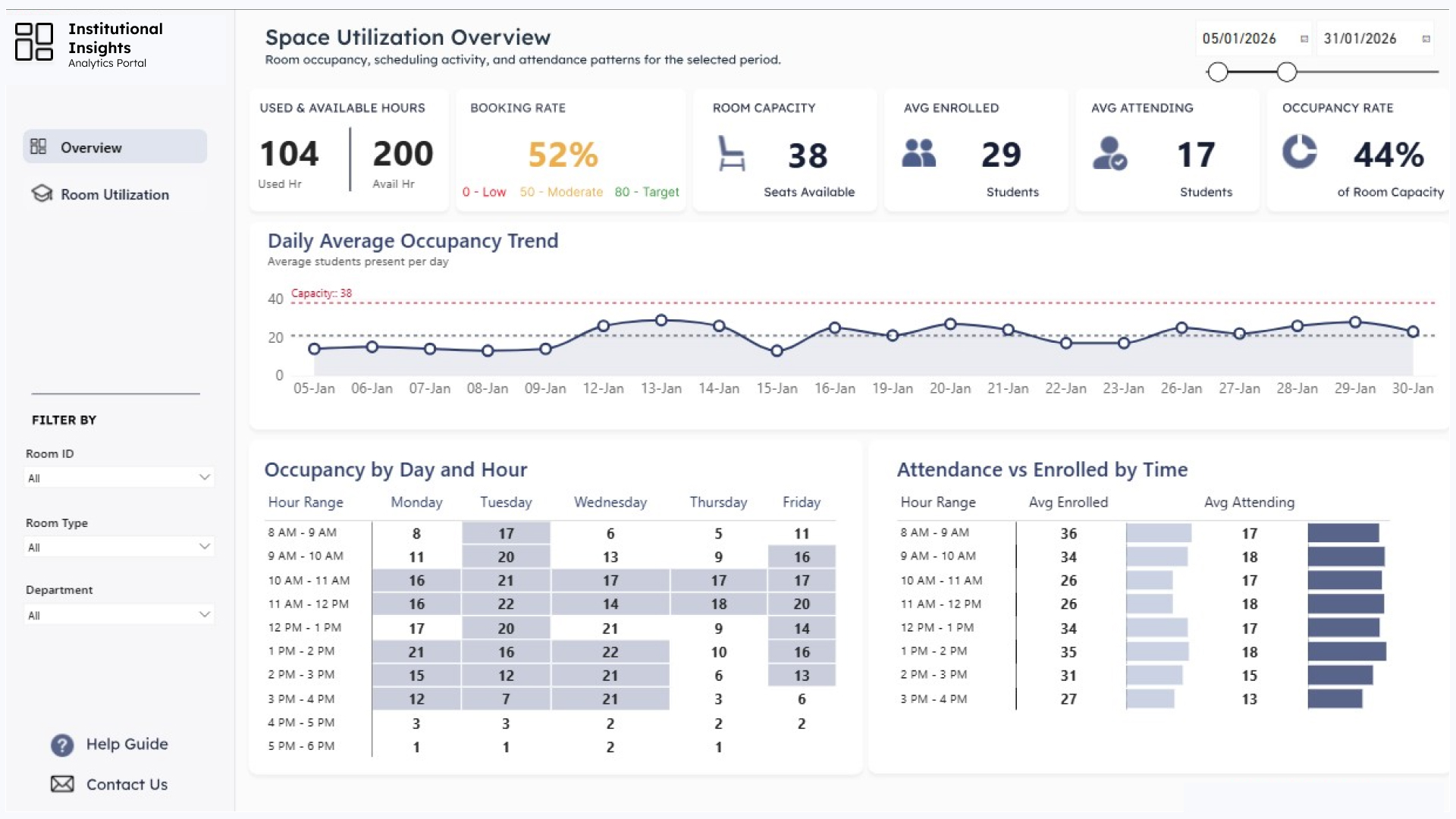
Space utilization overview dashboard
  • Executive KPI cards for used hours, booking rate, capacity, enrollment, attendance, and occupancy rate
  • Daily average occupancy trend compared against room capacity
  • Occupancy heatmap by weekday and hour range
  • Attendance versus enrollment comparison by time of day
  • Room, room type, and department filters
  • Guided tutorial overlay explaining the dashboard metrics

Guided Dashboard Experience

One of the requirements was to make the report easier for new users to understand without separate training. I added a built-in Help Guide that explains each KPI, chart, and metric in context, and the carousel shows both the final dashboard view and the guided overlay designed to support user adoption.

Space utilization overview dashboard

Key Findings

  • 52% booking rate showed moderate use of available operating hours.

  • 44% occupancy rate indicated that less than half of available room capacity was being used.

  • 29 enrolled versus 17 attending highlighted a consistent attendance gap across scheduled sessions.

Business Impact

  • Improved visibility into when classroom space was being used and where utilization was low.

  • Separated capacity from attendance so teams could avoid treating every utilization issue as a space shortage.

  • Supported scheduling decisions with a repeatable view of room, day, and hour-level utilization.

My Role

Requirements Gathering

Data Modeling

DAX Development

Dashboard UX Design

Power Query Prep

Stakeholder Reporting